Move onto Zendesk. Organize it. Extend it past your own customers.
EnvoyEngage is a family of apps for teams running customer experience on Zendesk. Get onto it with Migratron and Librarian, get more out of it with VendorApp and the RCS Bridge.
Built on the Zendesk you already run · No new system of record
Bring your history and your knowledge across, without the move being something you have to defend afterwards.
Serve the people your Zendesk was not built to reach — the layer past your own customers, and the channel they actually use.
Four apps, two jobs, one set of foundations
Getting your history and your knowledge across. Reaching the people your Zendesk was not built for. Each app is its own thing, and each inherits the same guarantees.
Get onto Zendesk
Bring your history and your knowledge across, without the move being something you have to defend afterwards.
Migrate your support history onto Zendesk, with sign-off at every step.
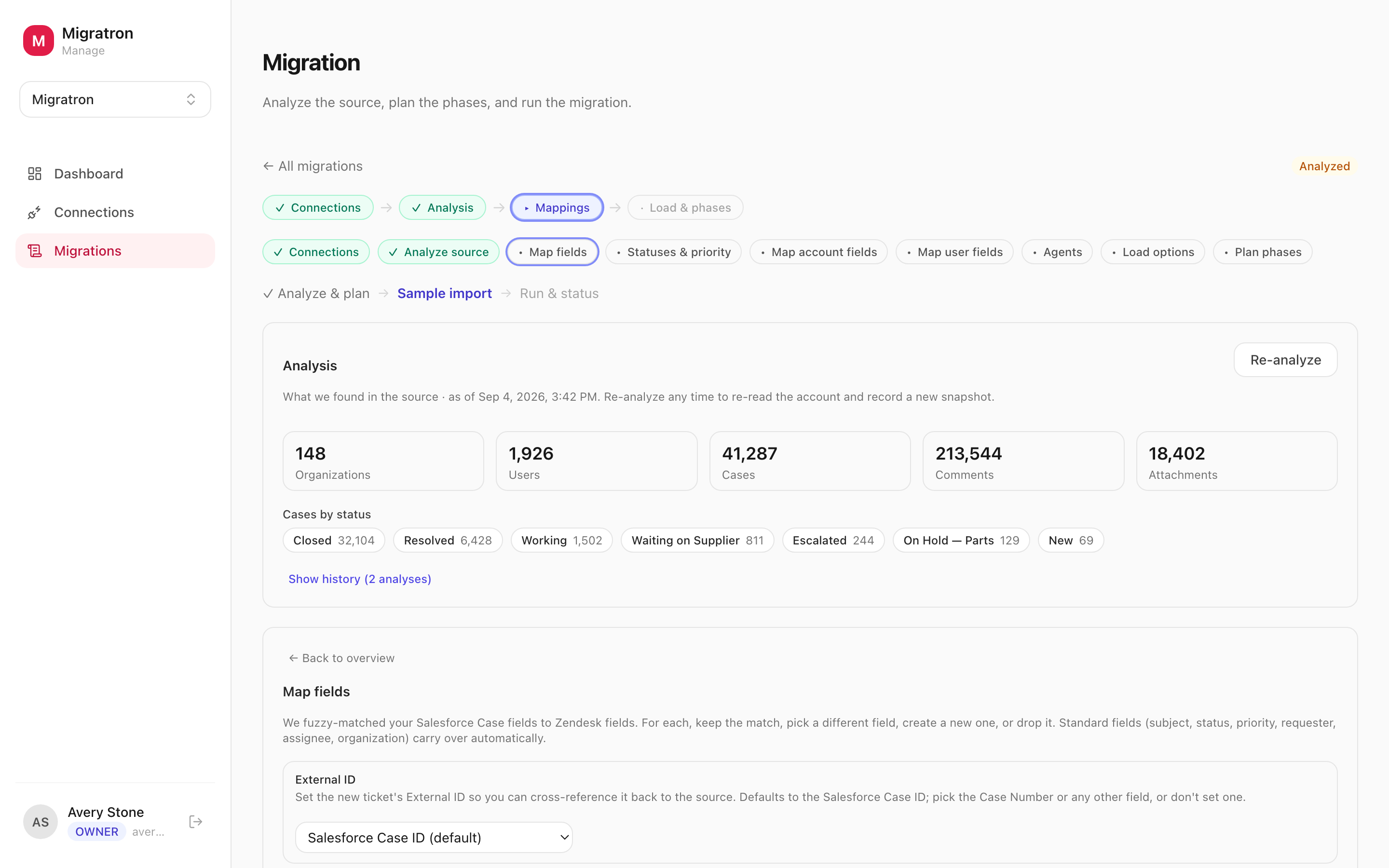
Migratron plans a migration in the open. It connects to your Salesforce org, an existing Zendesk, or CSV exports, analyzes what is actually in there, and walks you through field, account, user, and agent mappings one stage at a time. Nothing loads for real until a named approver has reviewed a live sample and said yes.
- Salesforce, Zendesk, and CSV sources — cases, accounts, contacts, agents, and whole comment threads, not just ticket headers.
- A guided workflow — connect, analyze, map, sample, load — where each stage is signed off before the next one opens.
- A real sample in your Zendesk that your reviewer walks ticket by ticket, with every approval and change request on the record.
- Migrate in phases, closed history first, so live cases move last and nobody loses a day to the cutover.
Turn the documents you already have into a Zendesk Guide worth reading.
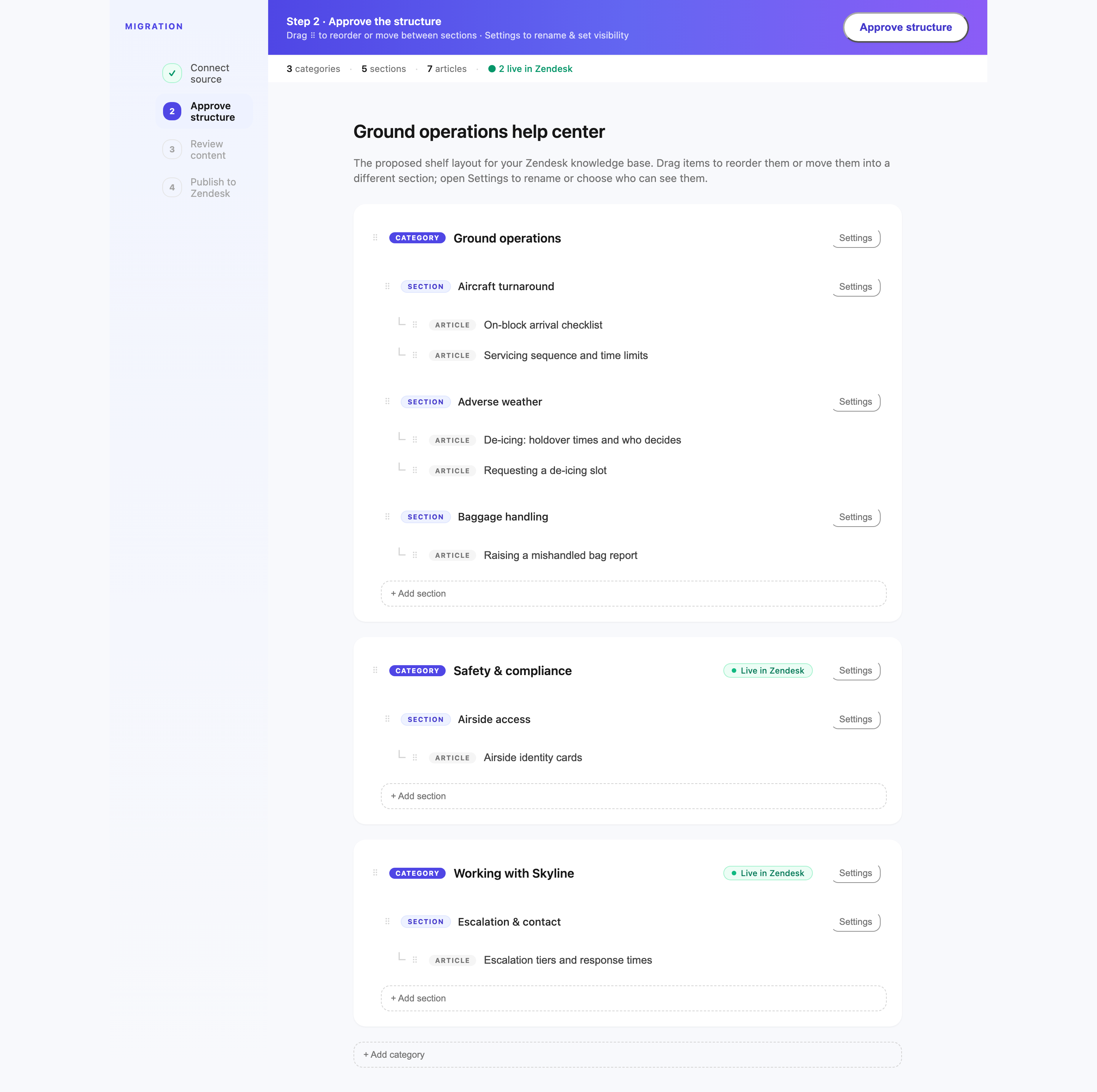
Librarian reads your source material — PDFs, Word documents, or a knowledge base you already run — and proposes a whole Guide hierarchy: categories, sections, and article drafts, each with the reasoning for where it landed. You approve the structure, then the content, then publish into Zendesk.
- Reads the PDFs and Word documents you already have, or lifts the structure of a knowledge base you already run.
- Proposes the entire category → section → article tree at once, slotted into the shelves your Guide already uses.
- Two review gates — structure, then content — and the person signing off never needs a Zendesk seat.
- Publishes into Guide with your locale, permissions, and visibility rules, and can land everything as drafts first.
Get more out of it
Serve the people your Zendesk was not built to reach — the layer past your own customers, and the channel they actually use.
Branded support portals for your customers' vendors and partners, run from inside Zendesk.
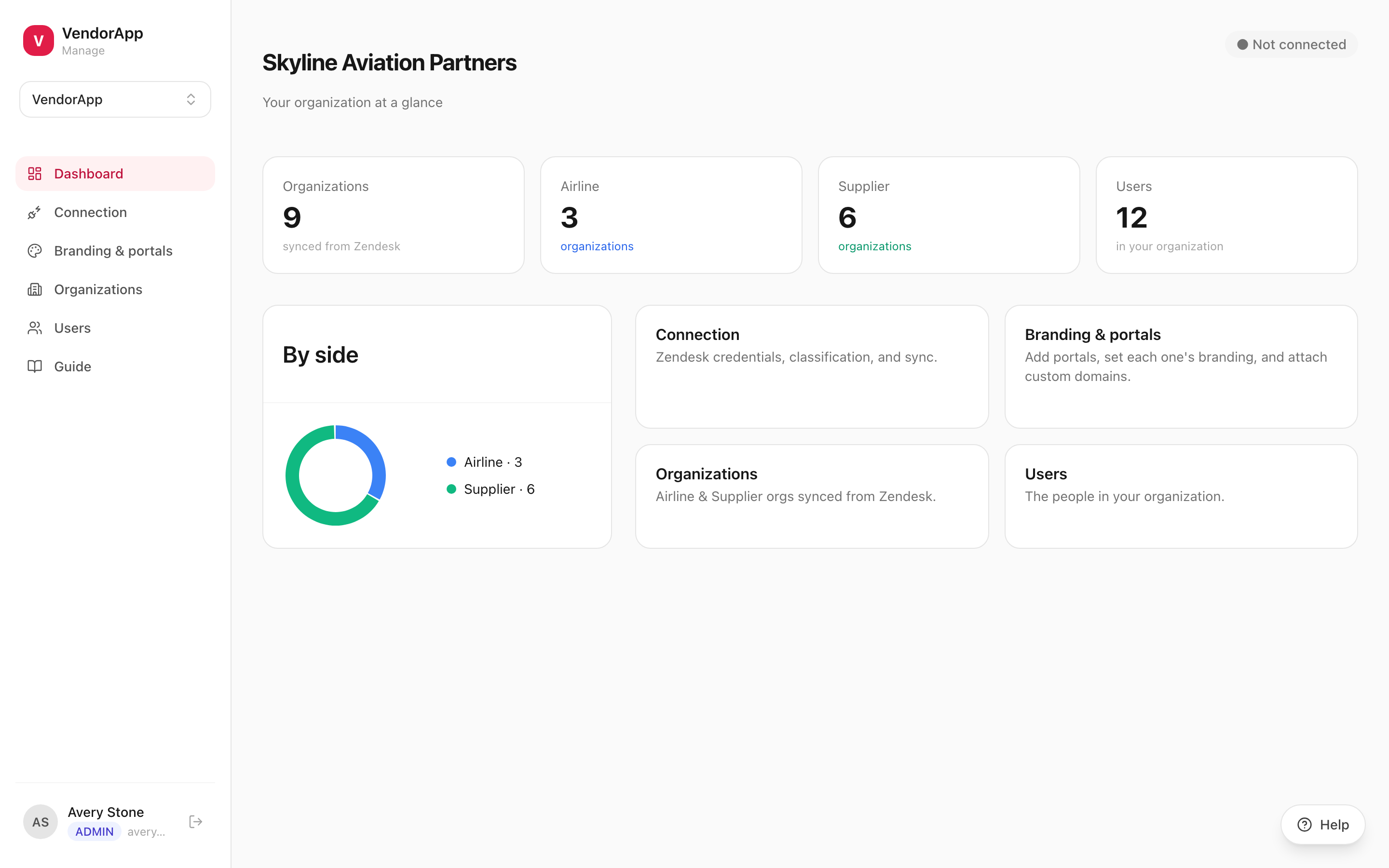
Your support does not stop at your direct customer. Their vendors raise issues with you, their partners chase you for updates, and the people those partners serve end up in your queue as well. VendorApp gives each of those parties its own branded portal, running on the Zendesk you already operate.
- A branded portal per party, on its own subdomain or a custom domain, with SSL handled for you.
- Two parties on a ticket and never a third — a vendor cannot see what another vendor filed.
- One console for every portal: branding, organizations, users, and the Zendesk connection.
- Administered from inside Zendesk Support, with no second login for your team to keep.
Answer verified RCS messages in Zendesk, from a sender that carries your brand.
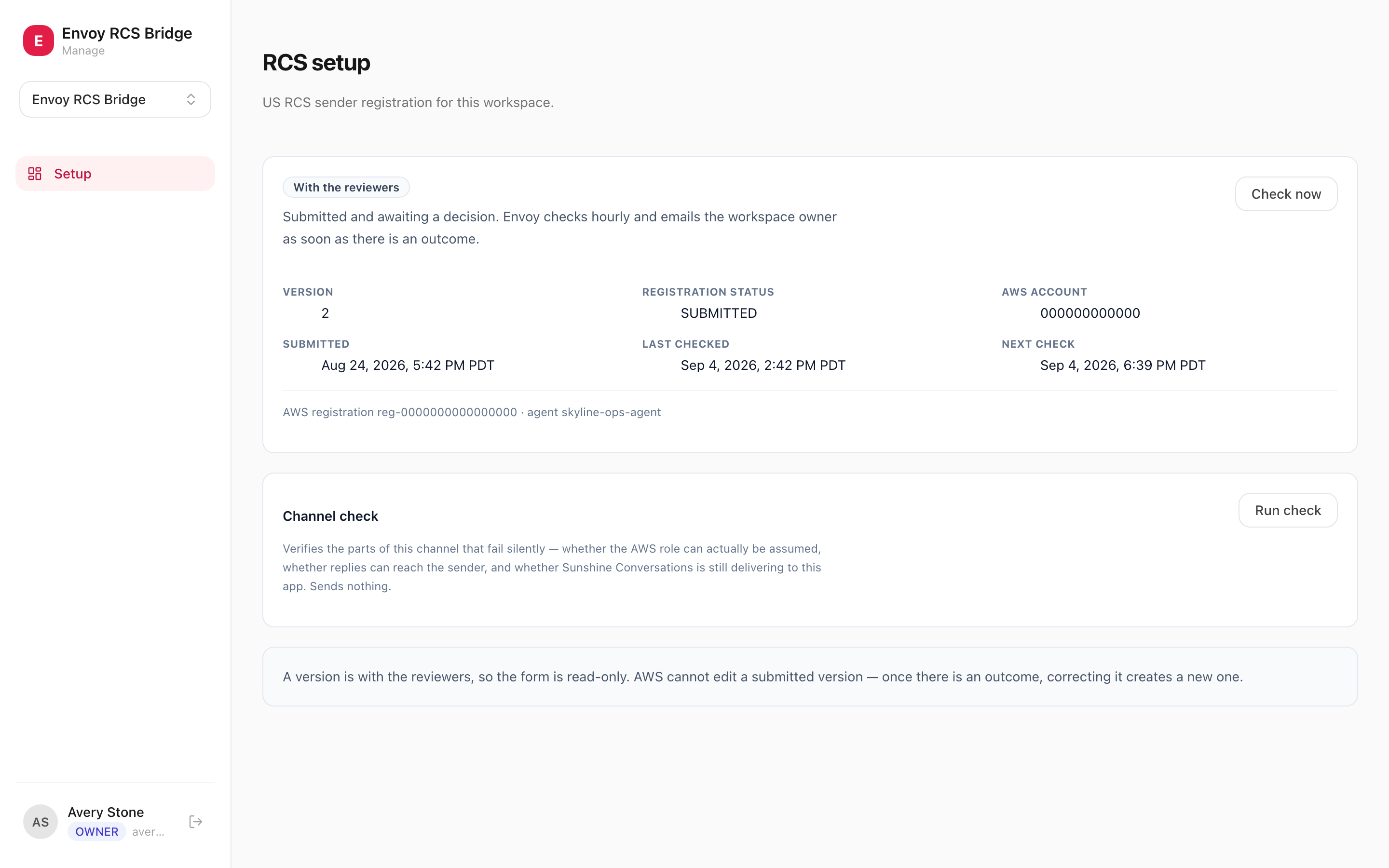
RCS is what replaced SMS on modern handsets: your name and logo instead of an unknown number, rich cards instead of 160 characters, and a verified badge that says the message is really from you. The Bridge carries those conversations into Zendesk, so an agent answers them in the same place they answer everything else.
- Two-way by default — a message from a handset opens a Zendesk conversation, and the agent's reply goes back to the handset.
- Your verified sender: brand name, logo, and colour on the handset, approved by Google and the carriers.
- Runs in your own AWS account, so the message traffic belongs to you rather than sitting in a vendor's system.
- The console tracks the registration — what is still missing, where the approval stands, and when it was last checked.
The hard parts, solved once — so every app inherits them
Isolation, access, branded domains, and a genuinely deep Zendesk integration are the platform's job, not yours. Whichever app you take on, it starts with all of that already true.
Your workspace is yours alone
Your data, your branding, your users — separated from every other customer's, with nothing shared but the software itself.
Who sees what, guaranteed
Every party sees only what belongs to them, and that limit is enforced by the database rather than by what a screen happens to show. It is the part we are least willing to get wrong.
Zendesk stays the system of record
Every app reads and writes the Zendesk you already run. Tickets, organizations, users, and Guide content stay where your agents work — there is no second system to reconcile.
The right people, the right access
Admins run the workspace; reviewers get a private link to approve the one thing they were asked to approve. Nobody needs a Zendesk seat to sign something off.
Branding & custom domains
Per-portal name, color, and logo, plus custom domains with automatic SSL. Every customer-facing surface looks like it belongs to whoever owns the relationship.
One console for every app
Connections, organizations, users, jobs, and branding all live in one place. Take on a second app and it simply appears alongside the first.
Live in three steps
One workspace, one Zendesk connection, and whichever apps you need — added and removed without touching the others.
Create your workspace
Sign up and pick your address — yourcompany.envoyengage.com — in under a minute.
Connect your Zendesk
Every app works against the Zendesk you already run. Organizations and users sync automatically; nothing becomes a second system of record.
Start with the app you need
Migrate with Migratron, rebuild your Guide with Librarian, open portals with VendorApp, or add RCS as a channel. Take on a second one later and it lands in the same console.
One platform for the whole operation.
Start your EnvoyEngage workspace and pick up the apps as you need them — from the migration that gets you onto Zendesk to the channel your customers actually message you on.

EnvoyEngage is the platform from Envoy, the CX experts who help industry leaders transform their customer experiences. Every app here started as work Envoy was doing by hand.
Who we are →